

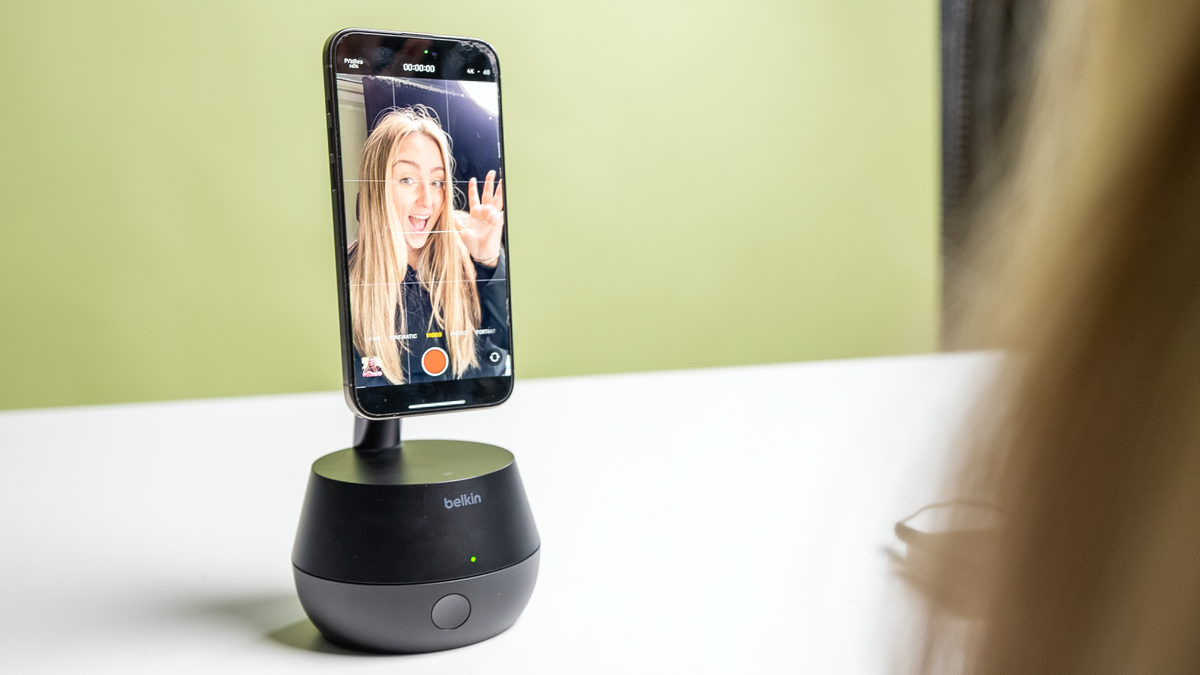
If there’s one thing you can say about me, it’s that I love gadgets that chase me.
Belkin Auto-Tracking Stand Pro is a battery-powered, 360-degree rotating and tilting phone mount that unlocks lesser-known iOS features.That feature is called dock kita developer SDK released by Apple as part of iOS17. DockKit-compatible accessories connect directly to both the front and back cameras of your iPhone and can track your head movements without the need for a third-party app.
In general, this kind of product may seem a bit niche for content creators, but in reality, you can use the Auto-Tracking Stand Pro for things like using your iPhone as a camera for FaceTime calls or meetings at your desk. There are other ways.
I tried the Auto-Tracking Stand Pro in all of these use cases and was pleased to find that it worked as advertised. Once I completed the one-time pairing process, mounted my phone on the stand via MagSafe, and opened the camera app, my phone was ready to track me. I danced from side to side, squatted, and stood on my toes. It adjusted my phone so that no matter how I moved, the device would find my face.
As a content creator, I see many benefits to something like the Belkin Auto-Tracking Stand Pro. That said, I’m not sure everyone needs to spend $179 on a high-tech iPhone stand. Check out my reasons below on whether you should buy or skip the Auto-Track Stand Pro.
Reasons to buy
No clunky third-party apps needed
The first reason I think you should buy the Belkin Auto-Tracking Stand Pro is the fact that you don’t need to download any additional apps or software to make it work. Just bring your phone there to start pairing, give the stand permission to connect to your phone via the DockKit framework, and it’s up and running in a few minutes. Once your iPhone is connected, it will automatically pair to the stand from then on.
Well, I have tried other face tracking stands before. However, these all involve recording with third-party apps and then downloading to your camera roll, which can be a big stumbling block depending on the type of content you’re shooting. And while there are no benefits to video calls, I found this to be a great perk of using the Belkin Auto-Tracking Stand Pro.
rechargeable battery
Another reason to buy the Belkin Auto Tracking Stand Pro is that it has a rechargeable battery, so you can take it with you and record content when you’re traveling or on the go without having to worry about connecting it to a charging cord. I’ve used it for hours at a time with no problems.
This device can operate on battery power for up to 5 hours before needing to be recharged. This should be more than enough for what you’re planning. You can also leave it connected to the charger if you leave it on your desk. Once connected, you can wirelessly charge your iPhone at 15W.
Benefits for Apple Watch users
The final reason we recommend the Belkin Auto Tracking Stand Pro is that it has some additional benefits for Apple Watch users. As you may know, Apple Watch has a camera remote app that allows you to control the camera remotely.
When you place your phone on this stand, you can easily switch between using the rear camera and selfie camera, and it will automatically adjust to detect your face. If you have an Apple Watch Series 9 or Apple Watch Ultra 2, you can also use the double-tap feature to conveniently control your camera.
Why skip?

Not the most affordable charging station
If you’re just looking for an average MagSafe charging stand, I think you can skip the Auto Tracking Stand Pro. While it’s true that this will charge your phone at more than 15W, the iPhone’s maximum wireless charging speed, it must be connected to a power outlet for it to work.
While this is convenient enough if you want to keep the stand stationary, there are also regular MagSafe charging stands that are much more affordable. If your phone is running on battery power, this will not charge it. This is a bit disappointing. I think the story would be different if it could also be used as a portable charger.
Compatibility limitations
If you have an iPhone 11 or older, or basically anything that’s not iPhone 12 or newer, you’ll want to avoid the Auto Tracking Stand Pro as well. This is only compatible with iPhones with MagSafe, and while most users considering this probably have their phones up to date, it’s still a setback.
bulky for travel
Finally, if you’re someone who likes to travel light, I’m not sure if the Auto Tracking Stand Pro is for you. We’ve seen creators traveling with heavy equipment, but if you just want to record with your iPhone, there are more compact portable tripods available. You can throw this in your car, but it’s a little bulky if you’re packing for a plane. I can’t say this is a major drawback, but it depends on what you want from a portable tripod.
Buy or Skip?
As someone who creates a lot of content, I have no shortage of tripods. Typically, you’ll want to look for one that has some kind of lighting built in as part of the setup. That said, we like how the Belkin Auto Tracking Stand Pro supports dynamic content captured directly with the iPhone’s native camera app. I can even see myself using it for meetings and FaceTiming him while on the go. more It’s not just about recording videos.
If you’re just looking for a charging station, this isn’t the one to buy. And be sure to check your phone’s compatibility first. Otherwise, this is a great iPhone accessory, and I wouldn’t be surprised if more gadgets use his DockKit in the near future.