

Is your desk plagued by tangled wires and cluttered power strips? You’re not alone. I don’t consider myself an organization freak, but keeping my electronics organized is a constant battle.
I doubt you have as many gadgets plugged into your computer and power outlet as I do. Of course, there is also a computer, electric standing desk, and computer monitor. Desk light, microphone, camera, various hard drives, Google Nest Hub, panel lights (2), light strip behind monitor, coffee cup warmer, iPad charger, SD card reader, speakers, USB desktop hub.
That means I have over 20 cables and power cords sitting behind my desk, gathering dust and getting in the way of my feet.
Our annual spring cleaning project is underway. Organize the clutter behind my desk.
If that’s the kind of thing you want to tackle, there are some gadgets and tools that can help you organize things.
First, take stock of your equipment. What should I plug into an electrical outlet? This usually includes my computer, monitor, speakers, and external hard drive. Devices such as cameras, microphones, and card readers connect directly to your computer’s USB ports.
For your safety and convenience, turn off and unplug your computer before tackling cables. Consider switching to wireless peripherals like a mouse and keyboard to free up USB ports and reduce wiring clutter.
Invest in a surge protector. Protect your device from electrical spikes. Choose a model with dedicated outlets for your TV, computer, and sound system, such as the Austere surge protector.
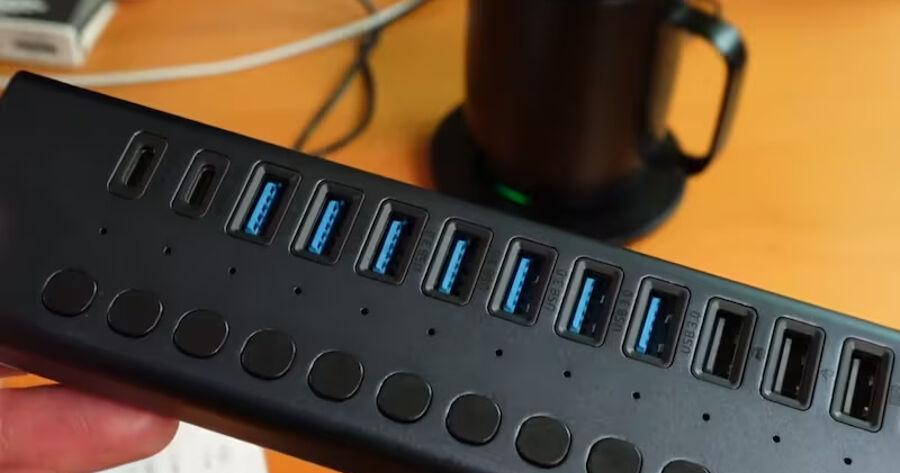
Next, prepare a USB hub. This handy device expands your computer’s USB ports, allowing you to connect multiple devices to your computer with a single cable. I bought one with 10 standard USB 3.0 ports, 3 fast charging ports, 2 USB-C ports, and a slot for an SD card for about $20.
Cable management is key! Use cable clips to secure wires along or under your desk. Magnetic cable holders are another great way to prevent cords from accumulating on your desktop.
For a true minimalist look, use cable ties to bundle and shorten excess cables. Just wrap the wires together and cut off the remaining plastic tail.
I grabbed two power strips and two wire racks or shelves attached to the back of my computer desk. These don’t require drilling holes in your desk. Simply hook it to the back to keep all your cables in one place.
Once everything is connected to the USB hub and power strip, secure the wire rack to the back of your desk using the included mounting hardware.
Consider a wireless phone charger for your desk that doesn’t require a separate cable. If you need an extra outlet, choose a desktop charging hub with an extra outlet and USB port.
While it may not be practical to eliminate all cables, following these steps will definitely create a cleaner, more functional workspace.
Please note that results may vary depending on the number of devices used. But with a little effort, you can eliminate cable clutter and reclaim space on your desk.